
Download Trend Micro HijackThis – spyware removal, malware scanner, system security, computer protection, security tool, antivirus utility, computer cleanup, digital safety, online protection, malware detection
Overview
Trend Micro HijackThis is a specialized utility designed to assist users in detecting and eliminating persistent spyware infections that may compromise system performance and digital safety. Unlike standard antivirus tools, this application focuses on deep-level system analysis, targeting vulnerable components such as browser helper objects, Registry entries, and other stealthy malware vectors. Its primary purpose is to serve as a diagnostic and remediation tool for users experiencing severe or recurring spyware infestations that traditional security software may fail to detect.
The app is particularly valuable for advanced users, IT professionals, and individuals seeking granular control over their system’s security posture. It does not provide real-time protection but instead functions as a post-infection analysis tool, generating detailed logs that can be reviewed or shared with experts for further assistance. Real-world use cases include troubleshooting browser redirects, identifying unauthorized system modifications, and cleaning up stubborn malware remnants after a security breach.
Developed by Trend Micro, a well-known name in cybersecurity, the application reflects the company’s long-standing commitment to digital safety and system integrity. While the developer did not provide additional technical details about the underlying scanning engine or detection logic, its reputation supports its credibility in the security tool ecosystem. Trend Micro HijackThis fills a niche role by offering a lightweight, focused solution for users who require more than what standard antivirus utilities offer.
Key Features & Functionality
- Targeted Scanning – The tool focuses on high-risk areas like browser helper objects, startup entries, and specific Registry keys, enabling efficient identification of suspicious or malicious components without scanning the entire system.
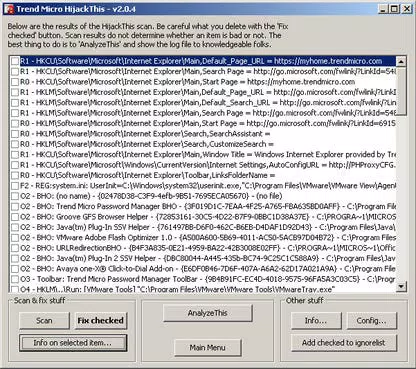
- Detailed Log Generation – Upon initiating a scan, HijackThis produces a comprehensive text log listing dozens of system entries. Most entries are user customizations, but flagged items may indicate malware. The log can be saved and shared with online forums for expert analysis.
- Information on Selected Items – Clicking the “Info on Selected Item” option provides context on why an entry was flagged, though it does not confirm whether the item is malicious. Users are advised to cross-reference entries with online resources or community forums.
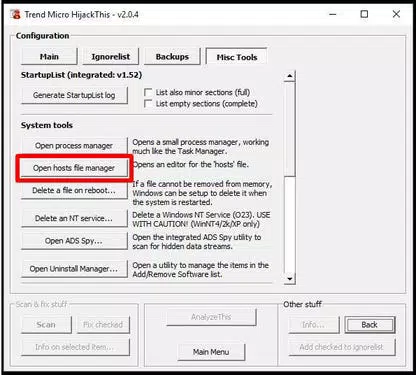
- Config Window Tools – The updated Config window includes a process manager and hosts file editor, allowing users to manually inspect and modify system processes and network configurations. These tools are essential for removing deeply embedded threats.
- ADS Spy Tool – This unique feature scans for alternate data streams (ADS), a technique used by some browser hijackers to hide malicious code from conventional scanners. This adds a layer of detection for advanced threats that evade standard removal tools.
Each feature is designed to empower users with insight and control. For example, a user experiencing unexpected browser redirects can use the targeted scan to identify a suspicious browser helper object, generate a log, and consult a security forum to verify the threat. Similarly, an IT technician dealing with a compromised workstation can leverage the Config window tools to manually clean infected system files and restore stability.
Interface, UX & Performance
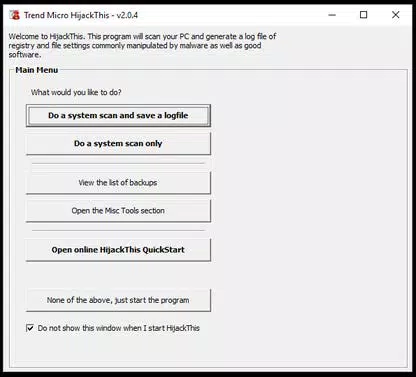
The user interface of Trend Micro HijackThis is minimalistic and functional, reflecting its role as a technical tool rather than a consumer-facing application. The layout is straightforward, with clearly labeled buttons such as “Scan,” “Fix Checked,” and “Info on Selected Item.” Navigation is linear and intuitive, suitable for users familiar with system-level troubleshooting.
Visual style is text-heavy and utilitarian, with no graphical enhancements or animations. This design choice prioritizes performance and clarity over aesthetics. The application loads quickly and operates with minimal system resource usage, making it suitable for use on older or low-spec machines.
Although the developer did not list formal performance metrics, the app’s lightweight footprint of 1.2 MB suggests efficient execution. Responsiveness is consistent across device categories, and stability appears reliable based on its long-standing presence in the security tool space. However, users should exercise caution when modifying system entries, as incorrect actions may impact system functionality.
Platform Compatibility & Technical Requirements
Trend Micro HijackThis is designed for the Windows operating system. The application is available in version 2.0.0 and has a file size of 1.2 MB. It is distributed as a free tool, with no cost to download or use.
The developer did not specify minimum OS requirements or compatibility details beyond the platform. As such, users should verify system compatibility before installation. While the app is lightweight and likely to function on older Windows versions, specific requirements were not disclosed. It is not available for Android or iOS platforms, as the tool is intended for desktop environments.
Pros and Cons
- Lightweight and fast, ideal for low-resource systems
- Focuses on high-risk system areas for precise malware detection
- Generates detailed, shareable logs for expert analysis
- Includes advanced tools like process manager and hosts file editor
- Free to download and use with no in-app purchases
- Not suitable for beginners due to technical complexity
- Lacks real-time protection and automated remediation
- No official support team for troubleshooting
- Improper use may cause system instability
- Compatibility details not fully disclosed
FAQ
Is Trend Micro HijackThis safe to use?
The tool is safe when used responsibly. It does not install malware or collect user data. However, users should only remove entries they are confident are malicious to avoid system issues.
Can I use HijackThis on mobile devices?
No. Trend Micro HijackThis is designed exclusively for Windows desktop systems and is not available for Android or iOS devices.
Does HijackThis provide real-time protection?
No. It is not a real-time antivirus. It functions as a diagnostic and cleanup tool used after a suspected infection has been identified.
How do I interpret the scan log?
The log lists system entries, most of which are harmless customizations. Users should only act on items flagged as suspicious after verifying them via online forums or security resources.
Is there a mobile version of HijackThis?
No. The application is a desktop utility for Windows and does not have a mobile counterpart.
Final Thoughts
Trend Micro HijackThis stands out as a powerful, no-frills utility for users confronting serious spyware threats. While not suited for casual users, it offers unmatched depth for those who need precise control over system-level cleanup. Its targeted scanning, detailed logging, and advanced configuration tools make it a vital asset in the digital safety toolkit.
For IT professionals, advanced users, and individuals dealing with stubborn infections, this app delivers tangible value. It complements existing security software by addressing threats that may slip through standard defenses.
Download Trend Micro HijackThis now


